Seven 3D formats. One Mac library.
STL, 3MF, STEP/STP, OBJ, AMF, PLY and USDZ files live side by side in HEXOstudios, each shown the way it should be, and G-code files are supported too.
- STL · 3MF · STEP · OBJ
- AMF · PLY · USDZ
- PLUS G-CODE

What HEXOstudios does with each format.
Every supported file is rendered as a card in your library and can be previewed in 3D.
HEXOstudios Free covers most formats without limits.
Pro removes the 3MF and STEP allowance and adds full-screen and inspection tools.
Every supported file is rendered as a card in your library and can be previewed in 3D. HEXOstudios Free covers most formats without limits; Pro removes the 3MF and STEP allowance and adds the full-screen and inspection tools.
| Format | Extensions | Thumbnails + 3D preview (Free) | Full 3D Preview (Pro) | File Passport (Pro) | HEXOforge in (Pro) | HEXOforge out (Pro) |
|---|---|---|---|---|---|---|
| STL | .stl | Yes | Unlimited | — | Yes | Yes |
| 3MF | .3mf | 12 files, for life | Unlimited + multi-plate | Yes | Yes | — |
| STEP / STP | .step, .stp | 12 files, for life | Unlimited | Yes | — | — |
| OBJ | .obj | Yes | Unlimited | — | Yes | Yes |
| AMF | .amf | Yes | Unlimited | — | Yes | — |
| PLY | .ply | Yes | Unlimited | — | Yes | Yes |
| USDZ | .usdz | Yes | Unlimited | — | — | — |
| G-code | .gcode, .gco, .g | Thumbnails | Toolpath view | Yes | — | — |
- STL.stl
- Thumbnails + 3D preview (Free)
- Yes
- Full 3D Preview (Pro)
- Unlimited
- File Passport (Pro)
- —
- HEXOforge in (Pro)
- Yes
- HEXOforge out (Pro)
- Yes
- 3MF.3mf
- Thumbnails + 3D preview (Free)
- 12 files, for life
- Full 3D Preview (Pro)
- Unlimited + multi-plate
- File Passport (Pro)
- Yes
- HEXOforge in (Pro)
- Yes
- HEXOforge out (Pro)
- —
- STEP / STP.step, .stp
- Thumbnails + 3D preview (Free)
- 12 files, for life
- Full 3D Preview (Pro)
- Unlimited
- File Passport (Pro)
- Yes
- HEXOforge in (Pro)
- —
- HEXOforge out (Pro)
- —
- OBJ.obj
- Thumbnails + 3D preview (Free)
- Yes
- Full 3D Preview (Pro)
- Unlimited
- File Passport (Pro)
- —
- HEXOforge in (Pro)
- Yes
- HEXOforge out (Pro)
- Yes
- AMF.amf
- Thumbnails + 3D preview (Free)
- Yes
- Full 3D Preview (Pro)
- Unlimited
- File Passport (Pro)
- —
- HEXOforge in (Pro)
- Yes
- HEXOforge out (Pro)
- —
- PLY.ply
- Thumbnails + 3D preview (Free)
- Yes
- Full 3D Preview (Pro)
- Unlimited
- File Passport (Pro)
- —
- HEXOforge in (Pro)
- Yes
- HEXOforge out (Pro)
- Yes
- USDZ.usdz
- Thumbnails + 3D preview (Free)
- Yes
- Full 3D Preview (Pro)
- Unlimited
- File Passport (Pro)
- —
- HEXOforge in (Pro)
- —
- HEXOforge out (Pro)
- —
- G-code.gcode, .gco, .g
- Thumbnails + 3D preview (Free)
- Thumbnails
- Full 3D Preview (Pro)
- Toolpath view
- File Passport (Pro)
- Yes
- HEXOforge in (Pro)
- —
- HEXOforge out (Pro)
- —
Free: thumbnails and 3D preview, with 3MF and STEP limited to 12 files each, for life.Pro: unlimited 3MF and STEP, plus Full 3D Preview (toolpath view for G-code), File Passport and HEXOforge.
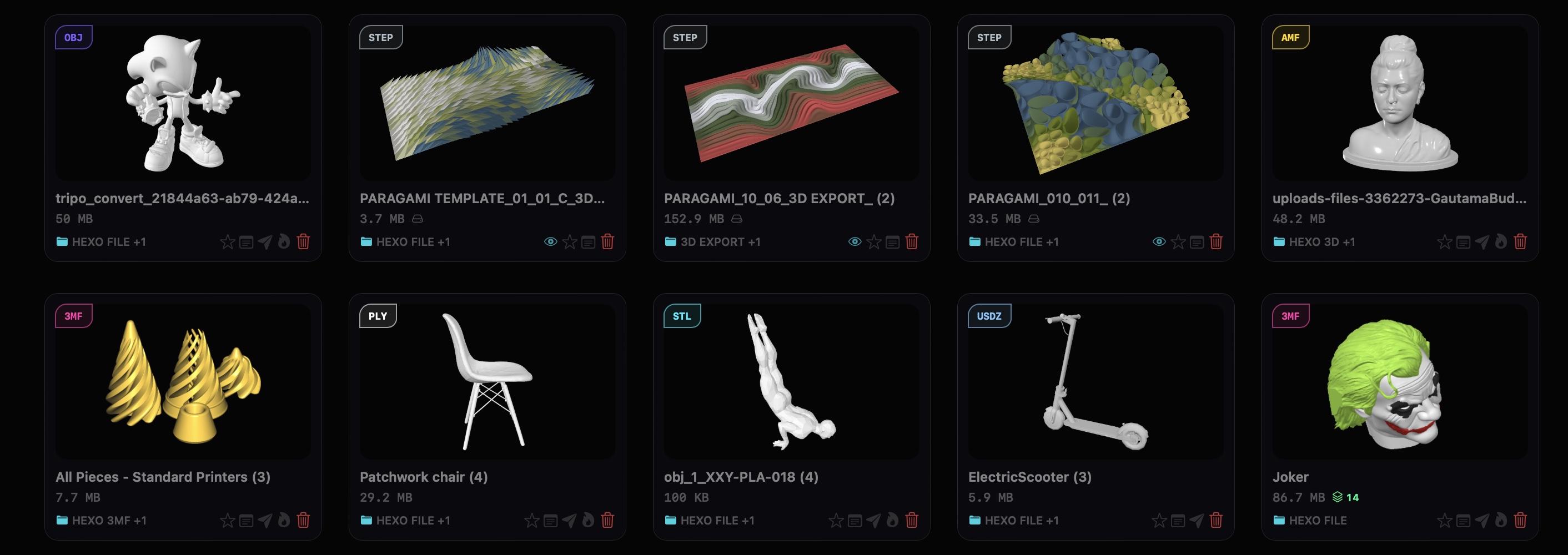
Mesh formats, unlimited on Free.
The everyday formats of 3D printing and 3D models get unlimited thumbnails and 3D preview on HEXOstudios Free.
STL
The standard for 3D printing: a triangle mesh of the model’s surface. HEXOstudios renders every STL as a thumbnail and previews it in 3D. More on the STL viewer for Mac.
OBJ
A widely used 3D model format from modeling and scanning tools. OBJ files get thumbnails and 3D preview, and HEXOforge (Pro) converts to and from OBJ.
PLY
Common for 3D scans. PLY files are previewed like any other mesh, and HEXOforge (Pro) converts to and from PLY.
AMF
The Additive Manufacturing File Format. HEXOstudios previews AMF files, and HEXOforge (Pro) turns them into STL, OBJ or PLY.
3MF print projects, plate by plate.
Multi-plate 3MF
HEXOstudios recognizes multi-plate 3MF files, shows the plate count on the file card and lets you step through each plate in 3D. Multi-plate support is for 3MF files only.
File Passport for 3MF PRO
Plate names, object counts, dimensions, filaments and print-time details when the file includes them.
Free and Pro
Free previews 12 unique 3MF files, for life; Pro previews every one. See the 3MF viewer for Mac.
STEP and STP, the CAD format, in the same library.
HEXOstpEngine
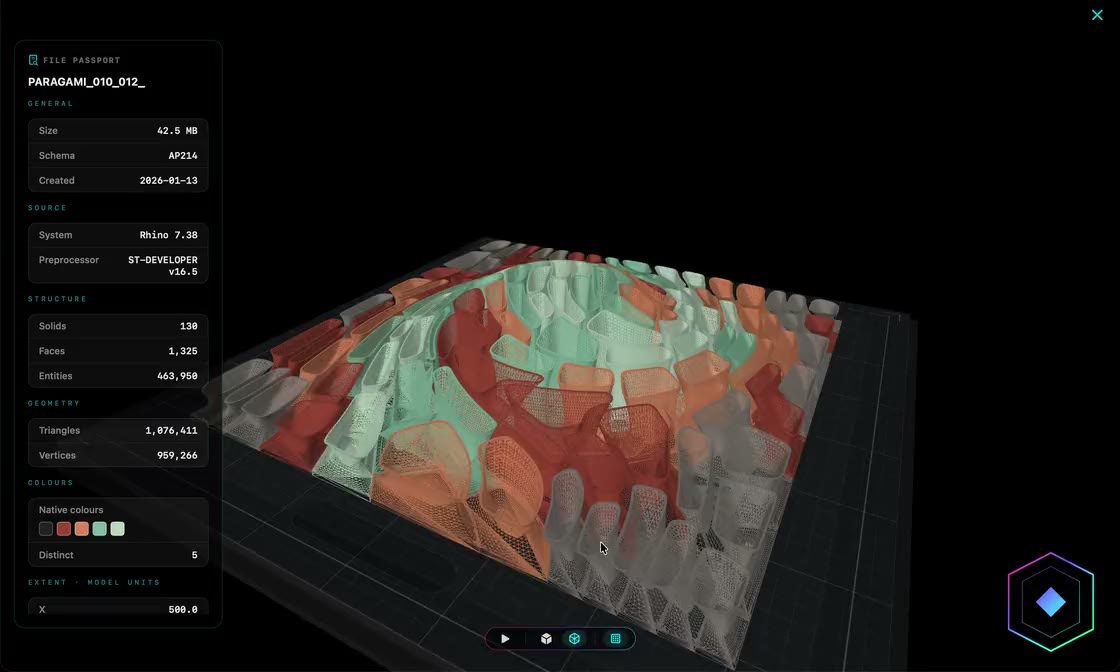
STEP files come from CAD software. HEXOstpEngine, HEXO’s own STEP technology, turns them into thumbnails, previews and interactive 3D in the file’s own colours inside HEXOstudios, processed on your Mac.
STEP or STP?
The same format: .step and .stp are two extensions for STEP files, and HEXOstudios opens both.
Free and Pro
Free previews 12 unique STEP files, for life; Pro previews every one, and File Passport (Pro) shows a STEP file’s source, structure and geometry.
USDZ, Apple’s 3D format.
Previewed with the rest
USDZ is the Universal Scene Description format Apple’s platforms use for 3D. USDZ files get unlimited thumbnails and 3D preview on HEXOstudios Free.
G-code: thumbnails, the toolpath and the print details.
Thumbnails, free
G-code is not a model but a printer’s instructions. Its card shows the thumbnail your slicer embedded in the file, or a drawing of the toolpath when there isn’t one.
A toolpath view PRO
Full Preview opens a G-code file as a top-down toolpath drawing, with the print time, filament, layers, nozzle, bed, speed and slicer beside it.
File Passport for G-code PRO
File Passport reads a G-code file’s slicer, print time, filament, layers, temperatures and speed, when the file includes them.
Convert between formats with HEXOforge.
In and out PRO
HEXOforge takes STL, OBJ, PLY, 3MF or AMF files from your library, up to 500 MB each (AMF up to 200 MB), and gives you a clean STL, OBJ or PLY copy in the Converted section of your library.
Local, always
Conversion runs entirely on your Mac: no upload, no internet, no credits.
Formats, answered.
Which file formats does HEXOstudios support?
Seven 3D formats: STL, OBJ, PLY, AMF, 3MF, USDZ and STEP (.step or .stp). G-code files are supported too: their cards show thumbnails, and Pro adds a toolpath view and their print details in File Passport.
What’s the difference between STEP and STP files?
There is none: .step and .stp are two extensions for the same STEP format, and HEXOstudios opens both.
Are 3MF and STEP previews free?
HEXOstudios Free previews 12 unique 3MF files and 12 unique STEP files, for life. Pro previews unlimited 3MF and STEP files.
Which formats can HEXOforge convert?
HEXOforge (Pro) converts STL, OBJ, PLY, 3MF and AMF files into clean STL, OBJ or PLY copies, locally on your Mac.
Every format, one library.
HEXOstudios is free on the Mac App Store. Try every Pro feature free for 14 days inside the app, then keep Pro for $24.99, once.
Questions? Write to support@hexostudios.com